OpenBao Backup Using SeaweedFS, MinIO, or AWS S3
This guide explains how to configure and manage automated OpenBao Raft snapshot backups by using SeaweedFS (default), MinIO, or AWS S3. It applies to the Connect-specific connect-openbao cluster deployed with automated backup functionality.
Backup Strategy Overview
OpenBao backups use full Raft snapshots. Each snapshot captures all secrets, policies, authentication methods, and system configuration at a point in time. Backups are not incremental. A reference copy of the first unseal key is stored alongside each snapshot for verification purposes.
Configurable options:
-
Schedule - Cron expression.
-
Object store configuration - Endpoint, bucket, credentials, and TLS settings for SeaweedFS, MinIO, or AWS S3.
-
Retention period - Automatic deletion of old snapshots by using object lifecycle policies when supported by the selected object store.
Configuration files:
For additional information on how to apply Helm value overrides, see Chart value override recommendations.
Prerequisites
-
Kubernetes cluster access with
kubectlconfigured and the appropriate permissions to:-
Access the namespace where
connect-openbaois deployed. -
Read Kubernetes secrets (required for manual unseal keys backup).
-
View job logs and status (required for backup verification).
-
-
Object storage is available for the target environment:
-
SeaweedFS (default):
http://seaweedfs1-s3.<zero-trust-namespace>.svc.cluster.local:8333 -
MinIO (supported): Foundation MinIO Operator and Foundation MinIO Tenant
-
AWS S3 (supported): Standard AWS S3 endpoint for your region
-
-
Kubernetes secret for S3 access and TLS certificates:
-
If you use AWS S3, create a secret named
aws-secretthat contains the access credentials. -
If you use SeaweedFS or MinIO, enable SecretManager with backend-specific source secret names and key casing. The destination keys are normalized to
AWS_ACCESS_KEY_ID/AWS_SECRET_ACCESS_KEYin{{ include "connect-openbao.fullname" . }}-s3-creds.
-
SeaweedFS values
+
secretManager:
  enabled: true
  secrets:
    s3-accesskey:
      name: seaweedfs1-secret
      namespace: '{{ .Values.global.foundation.zeroTrustNamespace }}'
      template:
        key: AWS_ACCESS_KEY_ID
        name: '{{ include "connect-openbao.fullname" . }}-s3-creds'
        namespace: '{{ .Release.Namespace }}'
        value: '{{`{{ index . "accessKey" }}`}}'
    s3-secretkey:
      name: seaweedfs1-secret
      namespace: '{{ .Values.global.foundation.zeroTrustNamespace }}'
      template:
        key: AWS_SECRET_ACCESS_KEY
        name: '{{ include "connect-openbao.fullname" . }}-s3-creds'
        namespace: '{{ .Release.Namespace }}'
        value: '{{`{{ index . "secretKey" }}`}}'
    s3-ca:
      name: seaweedfs1-server-tls
      namespace: '{{ .Values.global.foundation.zeroTrustNamespace }}'
      template:
        key: ca.crt
        name: '{{ include "connect-openbao.fullname" . }}-s3-tls'
        namespace: '{{ .Release.Namespace }}'
        value: '{{`{{ index . "ca.crt" }}`}}'
    s3-tls-key:
      name: seaweedfs1-server-tls
      namespace: '{{ .Values.global.foundation.zeroTrustNamespace }}'
      template:
        key: tls.key
        name: '{{ include "connect-openbao.fullname" . }}-s3-tls'
        namespace: '{{ .Release.Namespace }}'
        value: '{{`{{ index . "tls.key" }}`}}'
    s3-tls-crt:
      name: seaweedfs1-server-tls
      namespace: '{{ .Values.global.foundation.zeroTrustNamespace }}'
      template:
        key: tls.crt
        name: '{{ include "connect-openbao.fullname" . }}-s3-tls'
        namespace: '{{ .Release.Namespace }}'
        value: '{{`{{ index . "tls.crt" }}`}}'
MinIO values
+
secretManager:
  enabled: true
  secrets:
    s3-accesskey:
      name: minio1-secret
      namespace: '{{ .Values.global.foundation.zeroTrustNamespace }}'
      template:
        key: AWS_ACCESS_KEY_ID
        name: '{{ include "connect-openbao.fullname" . }}-s3-creds'
        namespace: '{{ .Release.Namespace }}'
        value: '{{`{{ index . "accesskey" }}`}}'
    s3-secretkey:
      name: minio1-secret
      namespace: '{{ .Values.global.foundation.zeroTrustNamespace }}'
      template:
        key: AWS_SECRET_ACCESS_KEY
        name: '{{ include "connect-openbao.fullname" . }}-s3-creds'
        namespace: '{{ .Release.Namespace }}'
        value: '{{`{{ index . "secretkey" }}`}}'
    s3-ca:
      name: minio1-tls
      namespace: '{{ .Values.global.foundation.zeroTrustNamespace }}'
      template:
        key: ca.crt
        name: '{{ include "connect-openbao.fullname" . }}-s3-tls'
        namespace: '{{ .Release.Namespace }}'
        value: '{{`{{ index . "ca.crt" }}`}}'
    s3-tls-key:
      name: minio1-tls
      namespace: '{{ .Values.global.foundation.zeroTrustNamespace }}'
      template:
        key: tls.key
        name: '{{ include "connect-openbao.fullname" . }}-s3-tls'
        namespace: '{{ .Release.Namespace }}'
        value: '{{`{{ index . "tls.key" }}`}}'
    s3-tls-crt:
      name: minio1-tls
      namespace: '{{ .Values.global.foundation.zeroTrustNamespace }}'
      template:
        key: tls.crt
        name: '{{ include "connect-openbao.fullname" . }}-s3-tls'
        namespace: '{{ .Release.Namespace }}'
        value: '{{`{{ index . "tls.crt" }}`}}'
OpenBao Backup Components
-
Raft snapshots: Capture a complete point-in-time backup of the OpenBao Raft storage backend. Each snapshot includes all secrets, policies, authentication methods, and system configurations stored in OpenBao.
-
Unseal keys backup: Stores a reference copy of the first unseal key from the unseal secret alongside each snapshot. This reference helps verify and identify the correct unseal keys to use during restore operations. Only the first key is stored for security reasons. The full unseal key set is not included.
-
Automated retention: Supports a configurable retention period on snapshot objects managed by object lifecycle policies. Old snapshot backups are automatically deleted after the defined retention period. This requires lifecycle-policy support in your object store implementation.
Critical: Manual Unseal Keys Backup
|
You must manually back up the complete unseal secret. |
Backups from the connect-openbao Helm chart store only the first unseal key as a verification reference. For a complete restore, you must have all unseal keys.
Configure OpenBao Backups
S3 Common Configuration
The following configuration applies to backup operations. Set all parameters exactly as specified for object-store connectivity.
-
s3CommonConfig.endpoint: Object-store endpoint URL. -
s3CommonConfig.region: Object-store region. -
s3CommonConfig.bucket: Target bucket for backups. -
s3CommonConfig.auth.accessKey: Access key for authentication. -
s3CommonConfig.auth.secretKey: Secret key for authentication. -
s3CommonConfig.externalCa.enabled: Set totrueif using a custom CA certificate. -
s3CommonConfig.externalCa.cert: Certificate file name (e.g.,ca.crt). -
s3CommonConfig.auth.secretNameands3CommonConfig.externalCa.secretName: Required if you provide your own Kubernetes secret (instead of relying on the SecretManager-generated one). -
s3CommonConfig.forceAwsStyle: Set totruefor SeaweedFS/MinIO andfalsefor AWS S3.
SeaweedFS values
+
openbao:
  s3CommonConfig:
    endpoint: "http://seaweedfs1-s3.foundation-cluster-zerotrust.svc.cluster.local:8333"  # SeaweedFS default endpoint
    region: "us-east-1" # Region name
    bucket: "foundation-pf" # Bucket name
    auth:
      # secretName: s3-creds # Leave this commented out if you are using the SecretManager block as specified in the prerequisites.
      accessKey: AWS_ACCESS_KEY_ID # Access key
      secretKey: AWS_SECRET_ACCESS_KEY # Secret key
    externalCa:
      enabled: false # Set to true when using HTTPS with custom CA
      # secretName: s3-tls # Kubernetes secret containing the TLS certificate.
      cert: ca.crt # Certificate file name
    forceAwsStyle: "true" ## Set true for SeaweedFS/MinIO, false for AWS S3
MinIO values
+
openbao:
  s3CommonConfig:
    endpoint: "https://minio.foundation-cluster-zerotrust.svc.cluster.local:443"  # MinIO default endpoint
    region: "us-east-1" # Region name
    bucket: "foundation-pf" # Bucket name
    auth:
      # secretName: s3-creds # Leave this commented out if you are using the SecretManager block as specified in the prerequisites.
      accessKey: AWS_ACCESS_KEY_ID # Access key
      secretKey: AWS_SECRET_ACCESS_KEY # Secret key
    externalCa:
      enabled: true # Set to false only if your MinIO endpoint does not require a custom CA
      # secretName: s3-tls # Kubernetes secret containing the TLS certificate.
      cert: ca.crt # Certificate file name
    forceAwsStyle: "true" ## Set true for SeaweedFS/MinIO, false for AWS S3
S3 Backup Configuration
The following configuration is required to enable backups for an OpenBao cluster:
-
s3BackupConfig.enabled: Set totrueto enable backups. -
s3BackupConfig.schedule: Define the backup schedule as a cron expression (configure as needed). -
s3BackupConfig.backupPath: Specify the S3 bucket path where backups are stored. This value should be unique for each deployment. -
Optional:
s3BackupConfig.retention: Define the number of days to retain backups (requires lifecycle-policy support in your object store).
openbao:
  s3BackupConfig:
    enabled: true ## Set to false to disable backups for this cluster.
    schedule: "0 */6 * * *"  ## Cron schedule for backup jobs (every 6 hours)
    backupPath: "openbao-backup" ## S3 path to store backups
    retention: "180"  # Number of days to retain backups (requires object-store lifecycle support)
Apply Backup Configuration
Add the S3 common configuration and backup configuration to the connect-openbao/values.yaml file, and then redeploy the connect-openbao release to enable backups.
Deploy or update the connect-openbao release with the updated values:
helm upgrade --install connect-openbao connect-helm/connect-openbao \
  --namespace foundation-env-default \
  --values connect-openbao/values.yaml
Verification
After you apply the backup configuration, verify that backups are stored correctly in the configured object store. Also verify that the object lifecycle policy is configured correctly for the backup path, such as openbao-backup, to ensure automated retention management.
Object Store Console UI
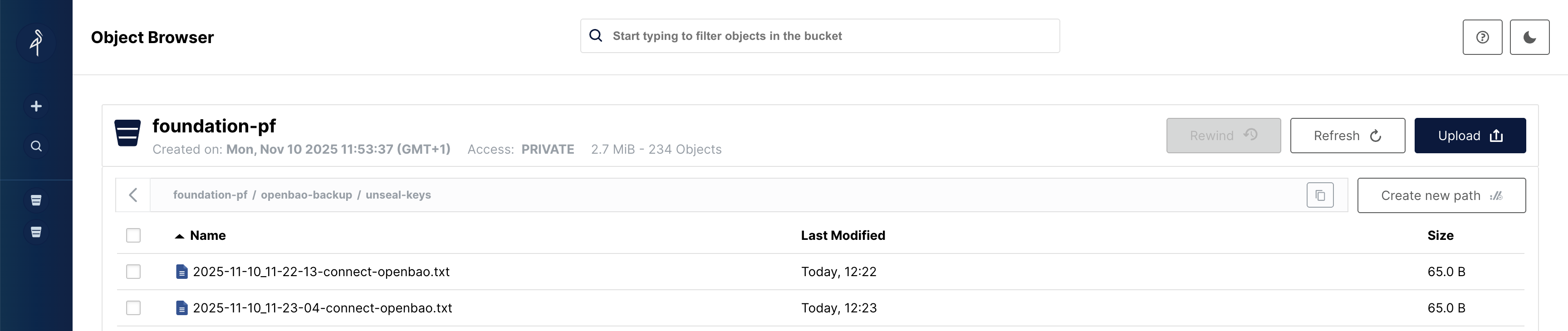
Sign in to your object-store console (SeaweedFS filer UI, MinIO console, or AWS S3 console). Under the specified bucket, such as foundation-pf, you should see the following:
-
Snapshots: Stored under
foundation-pf/openbao-backup/snapshots/with timestamped file names. -
Unseal keys: Stored under
foundation-pf/openbao-backup/unseal-keys/. -
Object lifecycle policy: Verify that a lifecycle policy exists on the bucket to automatically remove objects from the backup path after the retention period specified in
openbao.s3BackupConfig.retention.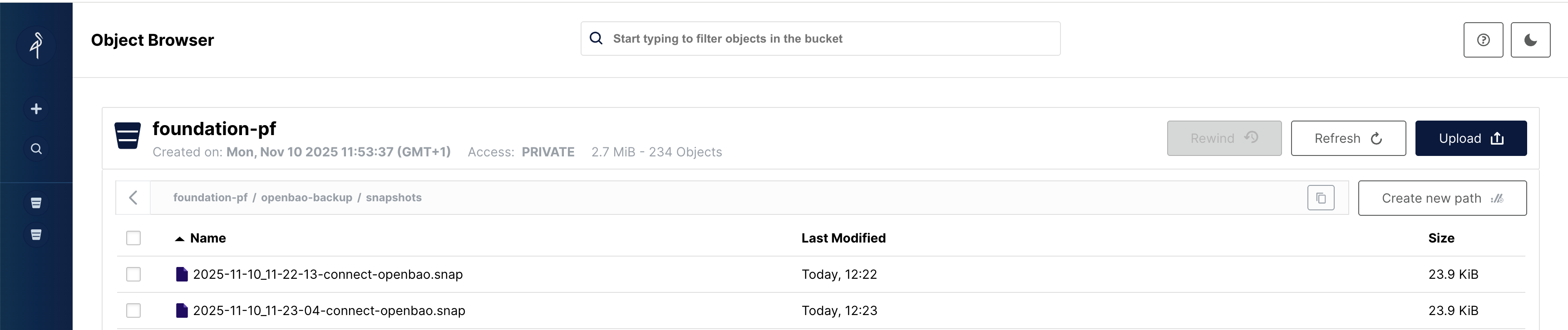
Command Line Verification
View Backup History:
Verify that the scheduled backup CronJob exists and review its run history. The CronJob status displays the schedule and the last scheduled time. The jobs list shows currently running, failed, and successful jobs. By default, only the last three successful or failed jobs are listed. Each finished job has a time-to-live value of 300 seconds.
# Check CronJob status
kubectl -n foundation-env-default get cronjob connect-openbao-backup

# Check recent backup job runs
kubectl -n foundation-env-default get jobs -l app.kubernetes.io/name=connect-openbao
Check backup job logs:
Review the logs from backup job runs to confirm successful completion or to diagnose any failures.
# Get logs from the most recent backup job
kubectl -n foundation-env-default logs -l app.kubernetes.io/name=connect-openbao
Example successful backup log output:
{"level":"INFO","timeMillis":1762852323827,"pod":"connect-openbao-backup-29380872-cmfts","message":"Starting OpenBao backup to s3://foundation-pf/openbao-backup"}
{"level":"INFO","timeMillis":1762852323855,"pod":"connect-openbao-backup-29380872-cmfts","message":"Taking OpenBao snapshot..."}
{"level":"INFO","timeMillis":1762852323895,"pod":"connect-openbao-backup-29380872-cmfts","message":"Snapshot created successfully (Size: 24450 bytes)"}
{"level":"INFO","timeMillis":1762852324863,"pod":"connect-openbao-backup-29380872-cmfts","message":"Snapshot uploaded: s3://foundation-pf/openbao-backup/snapshots/2025-11-11_09-12-03-connect-openbao.snap"}
{"level":"INFO","timeMillis":1762852325778,"pod":"connect-openbao-backup-29380872-cmfts","message":"First unseal key uploaded: s3://foundation-pf/openbao-backup/unseal-keys/2025-11-11_09-12-03-connect-openbao.txt"}
{"level":"INFO","timeMillis":1762852325785,"pod":"connect-openbao-backup-29380872-cmfts","message":"Backup of snapshot and unseal-key completed successfully"}
Verify unseal key backup integrity:
Compare the first unseal key from your backup in Critical: Manual Unseal Keys Backup with the contents of the object-store backup file foundation-pf/openbao-backup/<date+time>connect-openbao.txt to make sure they match.