Byte Streaming
Byte streaming transfers data from a source to a destination without loading the complete payload into Flow Server memory. The bytes pass through Connect unchanged, and memory usage for each transfer is based on the stream buffer rather than the payload size.
Use byte streaming when payloads are too large to process safely as regular in-memory payloads and the flow only needs to transfer the bytes. Currently, byte streaming supports one source, one destination, and a limited set of intermediate processors. The supported processors are grouped below by how they interact with the stream.
The bytes in the stream are not persisted and cannot be redelivered. Use regular payload processing when you need to inspect, transform, split, archive, replay, or send the payload to multiple destinations.
The diagram below illustrates the flow of a byte streaming process through Connect:
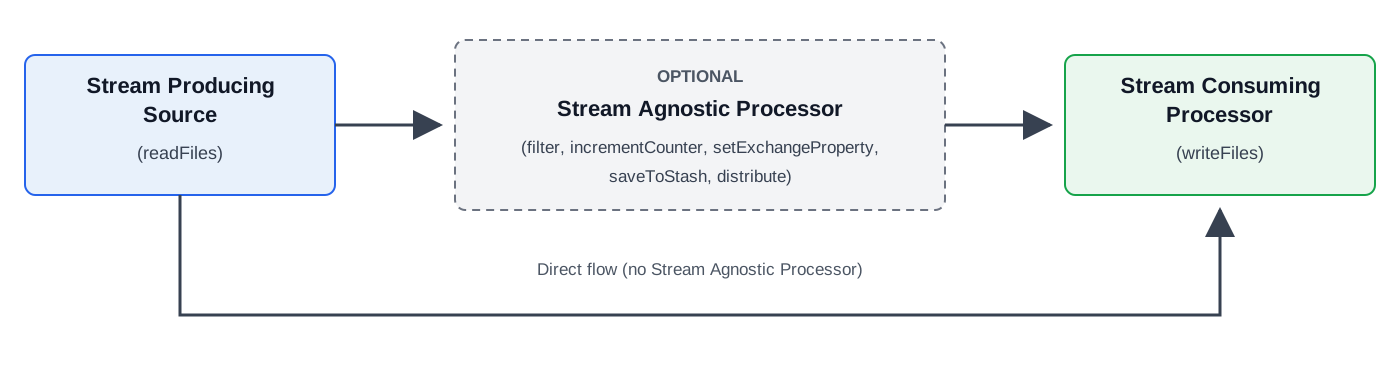
Stream Producing Source
The Stream Producing Source is responsible for generating the byte stream that will be consumed by a downstream Stream Consuming Processor.
The list below shows the currently supported Stream Producing Source:
The sources above may operate in a streaming or non-streaming mode depending on the value of the streamingEnabled property. When streamingEnabled is true, the source generates a byte stream instead of a regular in-memory payload.
Stream Consuming Processor
A Stream Consuming Processor receives the byte stream in the message.
The writeFiles processor reads the stream and writes the bytes to its destination.
These processors are Stream Consuming Processors:
The processors above may operate in a streaming or non-streaming mode depending on the actual payload. No additional configuration is required.
Stream Agnostic Processor
The Stream Agnostic Processor is a group of intermediate processors that may (optionally) be used in a streaming flow between the Stream Producing Source and the Stream Consuming Processor.
Stream Agnostic Processor will not receive the byte payload itself. Hence, they will not be able to access the stream content.
The list below shows the currently supported Stream Agnostic Processor:
These processors do not receive streaming payload and may operate only on message metadata, such as exchange properties.
|
Processor specific streaming behavior and / or limitations are described on the respective processor pages. |
Configure a Streaming Payload Transfer
To enable streaming, set streamingEnabled = true on the readFiles source. The writeFiles processor recognizes the streamed payload automatically.
The following example transfers one payload at a time between two file servers:
flowConfig {
    id = "stream-large-files"
    description = "Streams large files between SFTP servers"
    ownerId = OWNER_ID
    exchangePattern = RequestResponse

    maxNumberOfInFlightMessages = 1
    maxBufferSize = 0
    maxStashSize = 0

    redeliveryStrategy {
        redeliveryMaxNo = 0
        redeliveryMillis = 3_600_000
    }

    readFiles {
        id = "large-file-source"
        protocol = FileTransferProtocol.SFTP
        host = "source.example.com"
        authenticationConfigKey = "source-sftp-credentials"
        path = "/outgoing"
        maxMessagesPerPoll = 1
        streamingEnabled = true
    }

    writeFiles {
        id = "large-file-destination"
        protocol = FileTransferProtocol.SFTP
        host = "destination.example.com"
        authenticationConfigKey = "destination-sftp-credentials"
        path = "/incoming"
        outputTempFileNameExpr = "targetFileName + '.part'"
        writeTimeoutMillis = 3_300_000
    }
}
The example processes one payload at a time. maxMessagesPerPoll and maxNumberOfInFlightMessages both limit concurrent transfers to one, while maxBufferSize and maxStashSize prevent Connect from buffering or persisting stream data. outputTempFileNameExpr writes the destination to a temporary file and renames it after a successful transfer.
|
Set the flow-level |
Additional Deploy Time Validations
When streamingEnabled = true for a Stream Producing Source, you must perform the following additional validations during deploy time.
| Setting | Requirement |
|---|---|
|
Must be set to |
|
Do not set the scope to |
|
Must be set to |
|
Must be set explicitly to cover the longest expected transfer time, including downstream timeouts and a safety margin. |
|
Must be set to |
|
Must be set explicitly to limit concurrent transfers based on the capacity of the source, destination, and Flow Server. |
|
Must be set explicitly. A value of |
Additional Runtime Validations
When streamingEnabled = true, Connect validates the streaming pipeline before processing a streamed payload.
Processing fails in the following cases:
-
A payload archiving strategy is configured
-
An inbound transformation strategy is configured
-
The flow contains a processor that is not a stream agnostic or stream consuming processor
File and Error Handling
If redeliveryMillis expires while a transfer is active, Connect aborts processing, closes the stream, and returns a negative acknowledgment.
The same transfer failure can produce multiple log entries. Treat related entries as one failure when troubleshooting the transfer.
Disabling the source endpoint or stopping its Flow Server instance also interrupts active transfers.
Because the bytes in the stream cannot be persisted or read again, a dead-letter flow receives failure information rather than the original payload.
Monitor Streaming Transfers
Use the Flow Source Streaming Dashboard to monitor stream related metrics (Opened, Failed, Rejected, and Successful).