PostgreSQL Backup and Restore Using SeaweedFS, MinIO, or AWS S3
This guide explains how to manage PostgreSQL cluster backups and restores by using SeaweedFS (default), MinIO, or AWS S3. It applies only to the Connect-specific connect-postgresql cluster, not to the postgres-db-pg-cluster deployed with Foundation.
Backup Strategy Overview
PostgreSQL backups use WAL-G to perform full base backups with continuous WAL archiving, which enables point-in-time recovery (PITR). Each scheduled run creates a new base backup, while WAL segments are archived continuously between runs.
Example: With a six-hour cron job schedule (0 */6 * * *):
-
Every six hours, a full base backup is created and stored in the configured object store in the
basebackups_005folder. -
Between those six-hour intervals, WAL (Write-Ahead Log) segments are continuously archived as transactions occur in the
wal_005folder. -
Together, these backups enable restoration to any point in time by replaying WAL segments from the nearest base backup to your target timestamp.
Configurable options:
-
Schedule — cron expression for base backups
-
WAL archive timeout — maximum interval before forcing a WAL segment switch (
archive_timeout). -
Retention period — number of days to keep old backups.
-
Object store configuration — endpoint, bucket, credentials, and TLS settings for SeaweedFS, MinIO, or AWS S3.
-
Restore mode — restore to a base backup snapshot by omitting
s3RestoreConfig.timestamp, or set it to enable PITR and restore to a specific point in time.
Configuration files:
For additional information on how to apply Helm value overrides, see Chart value override recommendations.
Prerequisites
-
Object storage is available for the target environment:
-
SeaweedFS (default):
http://seaweedfs1-s3.<zero-trust-namespace>.svc.cluster.local:8333 -
MinIO (supported): Foundation MinIO Operator and Foundation MinIO Tenant
-
AWS S3 (supported): Standard AWS S3 endpoint for your region
-
-
Kubernetes secret for S3 access and TLS certificates:
-
If you use AWS S3, create a secret named
aws-secretthat contains the access credentials. -
If you use SeaweedFS or MinIO, enable SecretManager with backend-specific source secret names and key casing. The destination keys are normalized to
AWS_ACCESS_KEY_ID/AWS_SECRET_ACCESS_KEYin{{ include "connect-postgresql.fullname" . }}-s3-creds.
-
SeaweedFS values
secretManager:
  enabled: true
  secrets:
    s3-accesskey:
      name: seaweedfs1-secret
      namespace: '{{ .Values.global.foundation.zeroTrustNamespace }}'
      template:
        key: AWS_ACCESS_KEY_ID
        name: '{{ include "connect-postgresql.fullname" . }}-s3-creds'
        namespace: '{{ .Release.Namespace }}'
        value: '{{`{{ index . "accessKey" }}`}}'
    s3-secretkey:
      name: seaweedfs1-secret
      namespace: '{{ .Values.global.foundation.zeroTrustNamespace }}'
      template:
        key: AWS_SECRET_ACCESS_KEY
        name: '{{ include "connect-postgresql.fullname" . }}-s3-creds'
        namespace: '{{ .Release.Namespace }}'
        value: '{{`{{ index . "secretKey" }}`}}'
    s3-ca:
      name: seaweedfs1-server-tls
      namespace: '{{ .Values.global.foundation.zeroTrustNamespace }}'
      template:
        key: ca.crt
        name: '{{ include "connect-postgresql.fullname" . }}-s3-tls'
        namespace: '{{ .Release.Namespace }}'
        value: '{{`{{ index . "ca.crt" }}`}}'
    s3-tls-key:
      name: seaweedfs1-server-tls
      namespace: '{{ .Values.global.foundation.zeroTrustNamespace }}'
      template:
        key: tls.key
        name: '{{ include "connect-postgresql.fullname" . }}-s3-tls'
        namespace: '{{ .Release.Namespace }}'
        value: '{{`{{ index . "tls.key" }}`}}'
    s3-tls-crt:
      name: seaweedfs1-server-tls
      namespace: '{{ .Values.global.foundation.zeroTrustNamespace }}'
      template:
        key: tls.crt
        name: '{{ include "connect-postgresql.fullname" . }}-s3-tls'
        namespace: '{{ .Release.Namespace }}'
        value: '{{`{{ index . "tls.crt" }}`}}'
MinIO values
secretManager:
  enabled: true
  secrets:
    s3-accesskey:
      name: minio1-secret
      namespace: '{{ .Values.global.foundation.zeroTrustNamespace }}'
      template:
        key: AWS_ACCESS_KEY_ID
        name: '{{ include "connect-postgresql.fullname" . }}-s3-creds'
        namespace: '{{ .Release.Namespace }}'
        value: '{{`{{ index . "accesskey" }}`}}'
    s3-secretkey:
      name: minio1-secret
      namespace: '{{ .Values.global.foundation.zeroTrustNamespace }}'
      template:
        key: AWS_SECRET_ACCESS_KEY
        name: '{{ include "connect-postgresql.fullname" . }}-s3-creds'
        namespace: '{{ .Release.Namespace }}'
        value: '{{`{{ index . "secretkey" }}`}}'
    s3-ca:
      name: minio1-tls
      namespace: '{{ .Values.global.foundation.zeroTrustNamespace }}'
      template:
        key: ca.crt
        name: '{{ include "connect-postgresql.fullname" . }}-s3-tls'
        namespace: '{{ .Release.Namespace }}'
        value: '{{`{{ index . "ca.crt" }}`}}'
    s3-tls-key:
      name: minio1-tls
      namespace: '{{ .Values.global.foundation.zeroTrustNamespace }}'
      template:
        key: tls.key
        name: '{{ include "connect-postgresql.fullname" . }}-s3-tls'
        namespace: '{{ .Release.Namespace }}'
        value: '{{`{{ index . "tls.key" }}`}}'
    s3-tls-crt:
      name: minio1-tls
      namespace: '{{ .Values.global.foundation.zeroTrustNamespace }}'
      template:
        key: tls.crt
        name: '{{ include "connect-postgresql.fullname" . }}-s3-tls'
        namespace: '{{ .Release.Namespace }}'
        value: '{{`{{ index . "tls.crt" }}`}}'
Backup PostgreSQL Data
S3 Common Configuration
The following configuration applies to both backup and restore. All parameters must be set exactly as specified for object-store connectivity.
-
s3CommonConfig:-
endpoint: Object-store endpoint URL. -
region: Object-store region. -
bucket: Target bucket for backups. -
auth.accessKey: Access key for authentication. -
auth.secretKey: Secret key for authentication. -
externalCa.enabled: Set totrueif using a custom CA certificate. -
externalCa.cert: Certificate file name (e.g.,tls.crt). -
auth.secretNameandexternalCa.secretName: Required if you provide your own Kubernetes secret (instead of relying on the SecretManager-generated one).
-
|
If backup and restore need to use different object stores (different endpoint, region, bucket, credentials, or CA), for example restoring from another cluster’s bucket in a different region, you can override any of the fields above independently under Backup fields (
Restore fields (
For the For The default |
Object Store Profiles
| Object store | Endpoint | forceAwsStyle | TLS / CA guidance |
|---|---|---|---|
SeaweedFS |
|
|
Usually no custom CA when using HTTP |
MinIO |
|
|
If using HTTPS, set |
AWS S3 |
|
Custom CA normally not required |
SeaweedFS values
s3CommonConfig:
  endpoint: "http://seaweedfs1-s3.foundation-cluster-zerotrust.svc.cluster.local:8333"  # SeaweedFS default endpoint
  region: "us-east-1" # Region name
  bucket: "foundation-pf" # Bucket name
  auth:
    # secretName: s3-creds # Leave this commented out if you are using the SecretManager block as specified in the prerequisites.
    accessKey: AWS_ACCESS_KEY_ID # Access key
    secretKey: AWS_SECRET_ACCESS_KEY # Secret key
  externalCa:
    enabled: false # Set to true when using HTTPS with custom CA
    # secretName: s3-tls # Kubernetes secret containing the TLS certificate/CA bundle
    cert: tls.crt # Certificate file name
MinIO values
s3CommonConfig:
  endpoint: "https://minio.foundation-cluster-zerotrust.svc.cluster.local:443"  # MinIO default endpoint
  region: "us-east-1" # Region name
  bucket: "foundation-pf" # Bucket name
  auth:
    # secretName: s3-creds # Leave this commented out if you are using the SecretManager block as specified in the prerequisites.
    accessKey: AWS_ACCESS_KEY_ID # Access key
    secretKey: AWS_SECRET_ACCESS_KEY # Secret key
  externalCa:
    enabled: true # Set to false only if your MinIO endpoint does not require a custom CA
    # secretName: s3-tls # Kubernetes secret containing the TLS certificate/CA bundle
    cert: tls.crt # Certificate file name
S3 Backup Configuration
The following configuration is required to enable backups for a PostgreSQL cluster:
-
s3CommonConfig: Required, unless fully overridden with below optional configuration. -
s3BackupConfig:-
enabled: Set to true to enable backups. -
walgBackup: Set to true to use WAL-G for backups. -
schedule: Define the backup schedule as a cron expression (configure as required). -
prefix: Specify the S3 bucket path where backups are stored. This value must be unique for each fresh deployment. -
forceAwsStyle: Set to true for SeaweedFS/MinIO and false for AWS S3. -
retention: Define the number of days to retain backups (configure as required). -
optional:
endpoint: Override the object-store endpoint for backups (defaults tos3CommonConfig.endpoint). -
optional:
region: Override the object-store region for backups (defaults tos3CommonConfig.region). -
optional:
bucket: Override the object-store bucket for backups (defaults tos3CommonConfig.bucket). -
optional:
auth.accessKey: Override the access key for backups (defaults tos3CommonConfig.auth.accessKey). -
optional:
auth.secretKey: Override the secret key for backups (defaults tos3CommonConfig.auth.secretKey). -
optional:
auth.secretName: Override the secret name for backups (defaults tos3CommonConfig.auth.secretName). -
optional:
externalCa.enabled: Set to true when using HTTPS with custom CA (defaults tos3CommonConfig.externalCa.enabled). -
optional:
externalCa.cert: Certificate file name (defaults tos3CommonConfig.externalCa.cert). -
optional:
externalCa.secretName: Kubernetes secret containing the TLS certificate/CA bundle (defaults tos3CommonConfig.externalCa.secretName).
-
s3BackupConfig:
  enabled: true ## Set to false to disable WAL archiving for this cluster.
  timeoutSeconds: 1800 ## postgresql.conf 'archive_timeout' value: https://www.postgresql.org/docs/current/runtime-config-wal.html
  walgBackup: true ## Use WAL-G for backups.
  schedule: "*/5 * * * *"  ## patroni 'BACKUP_SCHEDULE' value. See: https://github.com/zalando/spilo/blob/2.1-p6/ENVIRONMENT.rst
  prefix: '{{ printf "s3://%s/pg-backup/postgresql/backups/%s/initial" (include "connect-postgresql.resolveS3BackupBucket" .) ( include "connect-postgresql.fullname" . ) }}' ## S3 path to the cluster backup. Use an absolute value or a Helm template. The default Helm template generates the next: 's3://foundation-pf/pg-backup/postgresql/backups/postgres-db-connect-postgresql/initial'
  forceAwsStyle: "true" ## Set true for SeaweedFS/MinIO, false for AWS S3
  retention: "5" ## Number of days to retain backups. See: https://github.com/zalando/spilo/issues/1066
  # endpoint: "" ## Optional: override object-store endpoint just for backups (defaults to s3CommonConfig.endpoint)
  # region: "" ## Optional: override region just for backups (defaults to s3CommonConfig.region)
  # bucket: "" ## Optional: override bucket just for backups (defaults to s3CommonConfig.bucket)
  # auth:
  #   secretName: "" ## Must be set for accessKey/secretKey below to take effect; otherwise falls back to s3CommonConfig.auth
  #   accessKey: AWS_ACCESS_KEY_ID
  #   secretKey: AWS_SECRET_ACCESS_KEY
Add the S3 common configuration and backup configuration to connect-postgresql/values.yaml file, then redeploy the release to enable backups.
For guidance on applying Helm value overrides, see Chart value override recommendations.
Deploy or update the connect-postgresql release with the updated values:
helm upgrade --install connect-postgresql connect-helm/connect-postgresql \
  --namespace foundation-env-default \
  --values connect-postgresql/values.yaml
Verification
After applying the backup configuration, verify that backups are stored correctly in the configured object store.
-
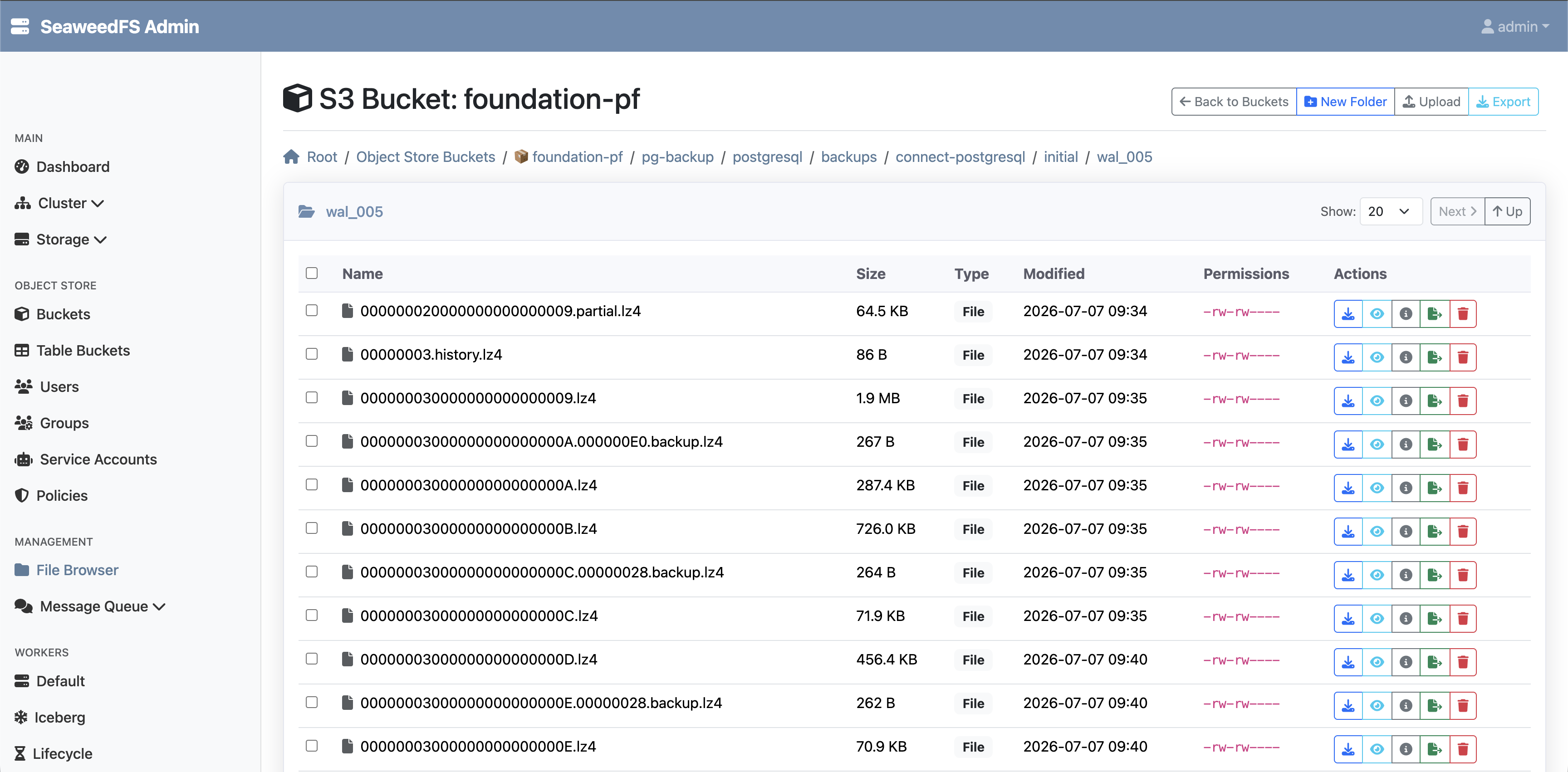
Object Store Console UI (SeaweedFS/MinIO/AWS S3): Under the configured bucket, verify both the base backups (in
basebackups_005) and WAL segments (inwal_005).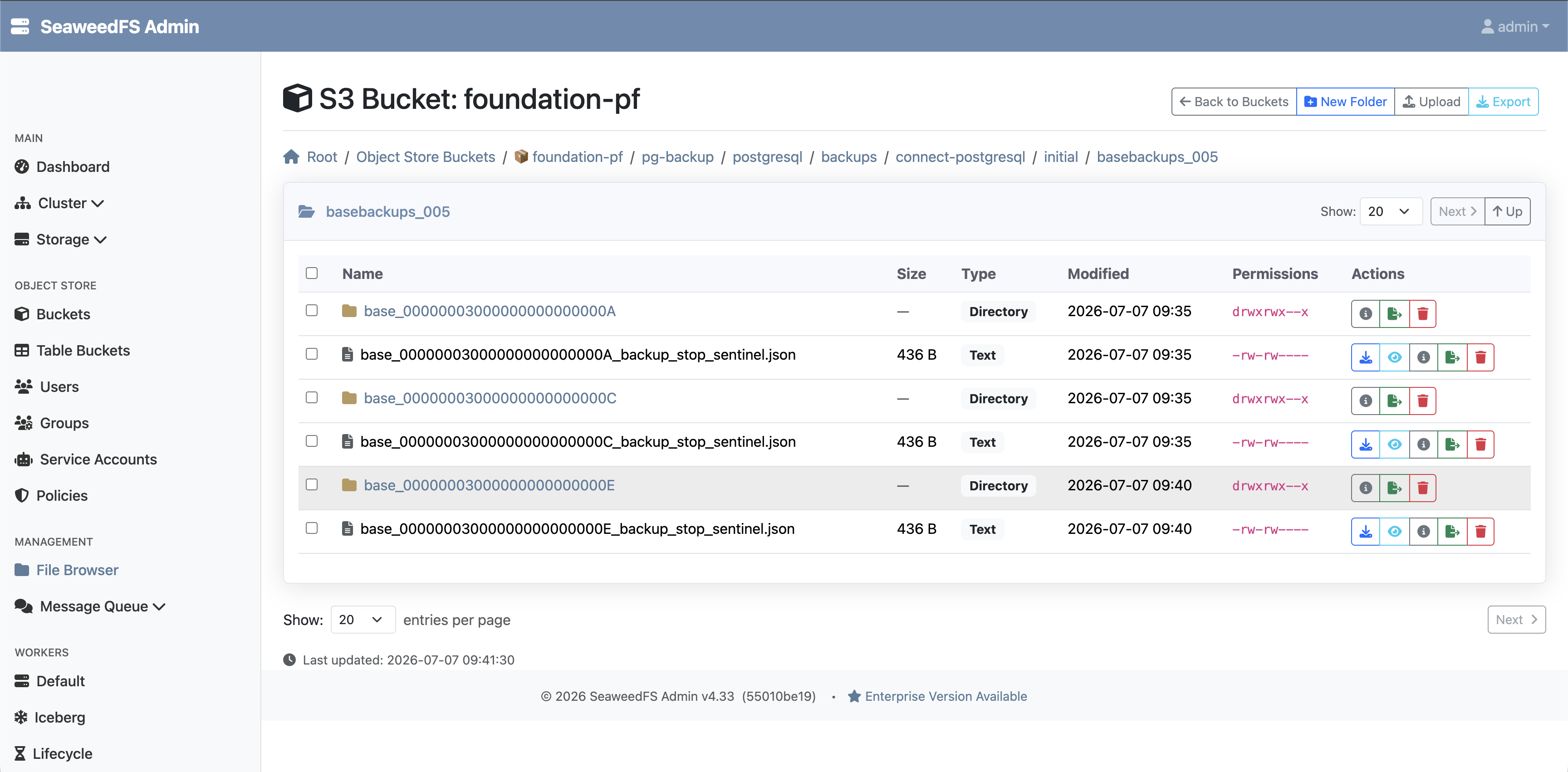
-
Optional: Verify via WAL-G commands (inside a PostgreSQL pod):
# List available base backups
kubectl -n foundation-env-default exec -it connect-postgresql-0 -- wal-g backup-list
Defaulted container "postgres" out of: postgres, exporter

INFO: 2025/09/11 18:39:14.114912 List backups from storages: [default]
backup_name                   modified             wal_file_name            storage_name
base_000000040000000000000028 2025-09-11T18:22:20Z 000000040000000000000028 default
base_00000004000000000000002A 2025-09-11T18:25:02Z 00000004000000000000002A default
base_00000004000000000000002C 2025-09-11T18:30:02Z 00000004000000000000002C default
base_00000004000000000000002E 2025-09-11T18:35:02Z 00000004000000000000002E default
Restore PostgreSQL Procedure
There are two restore options: clone-based restore and in-place restore.
Clone-based Restore Procedure
Clone-based restore creates a new PostgreSQL cluster (a clone) and restores the backed-up data into it. It is deployed as a separate Helm release.
| It is recommended to always test restores using a clone before attempting an in-place restore. |
There are two clone-based restore modes:
-
Clone with WAL-G (point-in-time recovery):
-
Restores from object-store backups (base backup + WAL files).
-
Does not require the original cluster to be running.
-
Supports Point-In-Time Recovery (PITR) to restore up to a specific timestamp.
-
-
Clone with Basebackup:
-
Streams data directly from the running primary PostgreSQL cluster using
pg_basebackup. -
Requires that the original cluster is up and running.
-
Example Configuration for Clone-based Restore
You need the following configuration for clone-based restore.
-
s3CommonConfig: Required, unless fully overridden with below optional configuration. -
s3BackupConfig.enabled: Set to false to avoid pushing backups from the restored clone. -
s3RestoreConfig.enabled: Set to true. -
s3RestoreConfig.walgRestore: Set to true to enable WAL-G based restore. -
s3RestoreConfig.prefix: Defines the exact S3 path to the backup location. -
s3RestoreConfig.forceAwsStyle: Set to true for SeaweedFS/MinIO and false for AWS S3. -
s3RestoreConfig.cluster: Specifies the cluster name whose S3 backup will bootstrap the clone. -
Optional:
s3RestoreConfig.timestamp: Specify the PITR timestamp if you want to perform a Clone with WAL-G (PITR). Omitting this parameter will perform a clone using the base backup instead. -
s3RestoreConfig:-
optional:
endpoint: Override the object-store endpoint for backups (defaults tos3CommonConfig.endpoint). -
optional:
region: Override the object-store region for backups (defaults tos3CommonConfig.region). -
optional:
bucket: Override the object-store bucket for backups (defaults tos3CommonConfig.bucket). -
optional:
auth.accessKey: Override the access key for backups (defaults tos3CommonConfig.auth.accessKey). -
optional:
auth.secretKey: Override the secret key for backups (defaults tos3CommonConfig.auth.secretKey). -
optional:
auth.secretName: Override the secret name for backups (defaults tos3CommonConfig.auth.secretName). -
optional:
externalCa.enabled: Set to true when using HTTPS with custom CA (defaults tos3CommonConfig.externalCa.enabled). -
optional:
externalCa.cert: Certificate file name (defaults tos3CommonConfig.externalCa.cert). -
optional:
externalCa.secretName: Kubernetes secret containing the TLS certificate/CA bundle (defaults tos3CommonConfig.externalCa.secretName).
-
The timestamp values in the examples below are placeholders. Replace them with an actual PITR target from your WAL history. The target must be less than or equal to the latest available WAL transaction time.
|
SeaweedFS values
For the default SeaweedFS HTTP endpoint, keep global.s3.externalCa.enabled set to false. Set it to true only when using HTTPS with a custom CA.
global:
  s3:
    externalCa:
      enabled: false # SeaweedFS default endpoint is HTTP; no custom CA mount needed.

replicaCount: 1
fullnameOverride: connect-postgresql-clone
s3BackupConfig:
  enabled: false
s3RestoreConfig:
  enabled: true
  walgRestore: true
  prefix: '{{ printf "s3://%s/pg-backup/postgresql/backups/%s/initial" (include "connect-postgresql.resolveS3RestoreBucket" .) .Values.s3RestoreConfig.cluster }}'
  forceAwsStyle: "true" ## Set true for SeaweedFS/MinIO, false for AWS S3
  cluster: "connect-postgresql" # Name of the PostgreSQL cluster to clone from
  timestamp: "2026-07-08T12:24:00+00:00" # Placeholder PITR target time. Replace with your actual restore target.
s3CommonConfig:
  endpoint: "http://seaweedfs1-s3.foundation-cluster-zerotrust.svc.cluster.local:8333"  # SeaweedFS default endpoint
  region: "us-east-1" # Region name
  bucket: "foundation-pf" # Bucket name
  auth:
    secretName: connect-postgresql-s3-creds # Reuse secret created by the source connect-postgresql release
    accessKey: AWS_ACCESS_KEY_ID # Access key
    secretKey: AWS_SECRET_ACCESS_KEY # Secret key
MinIO values
replicaCount: 1
fullnameOverride: connect-postgresql-clone
s3BackupConfig:
  enabled: false
s3RestoreConfig:
  enabled: true
  walgRestore: true
  prefix: '{{ printf "s3://%s/pg-backup/postgresql/backups/%s/initial" (include "connect-postgresql.resolveS3RestoreBucket" .) .Values.s3RestoreConfig.cluster }}'
  forceAwsStyle: "true" ## Set true for SeaweedFS/MinIO, false for AWS S3
  cluster: "connect-postgresql" # Name of the PostgreSQL cluster to clone from
  timestamp: "2026-07-08T12:24:00+00:00" # Placeholder PITR target time. Replace with your actual restore target.
s3CommonConfig:
  endpoint: "https://minio.foundation-cluster-zerotrust.svc.cluster.local:443"  # MinIO default endpoint
  region: "us-east-1" # Region name
  bucket: "foundation-pf" # Bucket name
  auth:
    secretName: connect-postgresql-s3-creds # Reuse secret created by the source connect-postgresql release
    accessKey: AWS_ACCESS_KEY_ID # Access key
    secretKey: AWS_SECRET_ACCESS_KEY # Secret key
  externalCa:
    enabled: true # Set false only if your MinIO endpoint does not require a custom CA
    secretName: connect-postgresql-s3-tls # Secret created by the source connect-postgresql SecretManager configuration
    cert: tls.crt # Certificate file name
To perform a clone-based restore, deploy a new PostgreSQL cluster with the restore configuration applied, as shown above.
Deploy the clone using Helm:
helm install connect-postgresql-clone connect-helm/connect-postgresql \
  --namespace foundation-env-default \
  --values connect-postgresql-clone/values.yaml
Verify the restored data:
-
Once the deployment is complete, a new PostgreSQL cluster
connect-postgresql-clonewill be created. -
Verify that the restored cluster contains all the data from the backup. For testing purposes, you can create a test database in the original cluster and then confirm its presence and contents in the restored cluster.
Disable restore after verification:
Once verification is complete, update your values.yaml to disable the restore via the s3RestoreConfig block and redeploy the Helm chart.
helm upgrade --install connect-postgresql-clone connect-helm/connect-postgresql \
  --namespace foundation-env-default \
  --values connect-postgresql-clone/values.yaml
In-place Restore Procedure
The in-place restore process restores a PostgreSQL cluster to its original state by using the same cluster name. This approach is typically used after a disaster, such as data loss or corruption.
Important: Before you perform an in-place restore, test recovery by using the clone-based restore approach first. This lets you validate the PITR timestamp and confirm that the data is restored correctly before you overwrite the original cluster.
Example Configuration of an In-place Restore
Use the following configuration for an in-place restore along with the S3 common configuration:
-
s3CommonConfig: Required, unless fully overridden with below optional configuration. -
s3BackupConfig.enabled: Set to false to avoid pushing backups from the restored clone. -
s3RestoreConfig:-
enabled: Set to true. -
walgRestore: Set to true to enable WAL-G-based restore. -
prefix: Defines the exact S3 path to the backup location. -
forceAwsStyle: Set to true for SeaweedFS/MinIO and false for AWS S3. -
cluster: Specifies the cluster name whose S3 backup will bootstrap the restored cluster. -
timestamp: Specifies the PITR timestamp, which is the point in time to which you want to restore. Set this to an actual value from your WAL history. -
optional:
endpoint: Override the object-store endpoint for backups (defaults tos3CommonConfig.endpoint). -
optional:
region: Override the object-store region for backups (defaults tos3CommonConfig.region). -
optional:
bucket: Override the object-store bucket for backups (defaults tos3CommonConfig.bucket). -
optional:
auth.accessKey: Override the access key for backups (defaults tos3CommonConfig.auth.accessKey). -
optional:
auth.secretKey: Override the secret key for backups (defaults tos3CommonConfig.auth.secretKey). -
optional:
auth.secretName: Override the secret name for backups (defaults tos3CommonConfig.auth.secretName). -
optional:
externalCa.enabled: Set to true when using HTTPS with custom CA (defaults tos3CommonConfig.externalCa.enabled). -
optional:
externalCa.cert: Certificate file name (defaults tos3CommonConfig.externalCa.cert). -
optional:
externalCa.secretName: Kubernetes secret containing the TLS certificate/CA bundle (defaults tos3CommonConfig.externalCa.secretName).
-
SeaweedFS values
s3BackupConfig:
  enabled: false
s3RestoreConfig:
  enabled: true
  walgRestore: true
  prefix: '{{ printf "s3://%s/pg-backup/postgresql/backups/%s/initial" (include "connect-postgresql.resolveS3RestoreBucket" .) .Values.s3RestoreConfig.cluster }}'
  forceAwsStyle: "true" ## Set true for SeaweedFS/MinIO, false for AWS S3
  cluster: "connect-postgresql" # Name of the PostgreSQL cluster to clone from
  timestamp: "2026-07-08T12:24:00+00:00" # Placeholder PITR target time. Replace with your actual restore target.
s3CommonConfig:
  endpoint: "http://seaweedfs1-s3.foundation-cluster-zerotrust.svc.cluster.local:8333"  # SeaweedFS default endpoint
  region: "us-east-1" # Region name
  bucket: "foundation-pf" # Bucket name
  auth:
    # secretName: s3-creds # Leave this commented out if you are using the SecretManager block as specified in the prerequisites.
    accessKey: AWS_ACCESS_KEY_ID # Access key
    secretKey: AWS_SECRET_ACCESS_KEY # Secret key
  externalCa:
    enabled: false # Set to true when using HTTPS with custom CA
    # secretName: s3-tls # Kubernetes secret containing the TLS certificate/CA bundle
    cert: tls.crt # Certificate file name
MinIO values
s3BackupConfig:
  enabled: false
s3RestoreConfig:
  enabled: true
  walgRestore: true
  prefix: '{{ printf "s3://%s/pg-backup/postgresql/backups/%s/initial" (include "connect-postgresql.resolveS3RestoreBucket" .) .Values.s3RestoreConfig.cluster }}'
  forceAwsStyle: "true" ## Set true for SeaweedFS/MinIO, false for AWS S3
  cluster: "connect-postgresql" # Name of the PostgreSQL cluster to clone from
  timestamp: "2026-07-08T12:24:00+00:00" # Placeholder PITR target time. Replace with your actual restore target.
s3CommonConfig:
  endpoint: "https://minio.foundation-cluster-zerotrust.svc.cluster.local:443"  # MinIO default endpoint
  region: "us-east-1" # Region name
  bucket: "foundation-pf" # Bucket name
  auth:
    # secretName: s3-creds # Leave this commented out if you are using the SecretManager block as specified in the prerequisites.
    accessKey: AWS_ACCESS_KEY_ID # Access key
    secretKey: AWS_SECRET_ACCESS_KEY # Secret key
  externalCa:
    enabled: true # Set to false only if your MinIO endpoint does not require a custom CA
    # secretName: s3-tls # Kubernetes secret containing the TLS certificate/CA bundle
    cert: tls.crt # Certificate file name
Before you restore, delete the original cluster:
kubectl delete postgresql connect-postgresql -n foundation-env-default
# or
helm delete connect-postgresql -n foundation-env-default
After deletion, verify that the persistent volumes (PVs) have been removed. Then redeploy the chart by using the SeaweedFS or MinIO restore configuration shown above.
Verify the restored data:
After redeployment, the connect-postgresql cluster is deployed and data is restored from the backup.
-
Verify that the restored cluster contains all data from the backup. For testing, you can create a test database in the original cluster and then confirm its presence and contents in the restored cluster.
If the cluster is configured with three replicas, only one pod becomes fully available (2/2) during the restore process. The remaining pods might remain in a 1/2 state. Perform your verification on the pod that shows 2/2.
|
Disable restore after verification:
After verification is complete, update your values.yaml file to disable restore in the s3RestoreConfig block, and then redeploy the Helm chart.
helm upgrade --install connect-postgresql connect-helm/connect-postgresql \
  --namespace foundation-env-default \
  --values connect-postgresql/values.yaml

kubectl delete pods -n foundation-env-default -l cluster-name=connect-postgresql
After disabling the restore via the s3RestoreConfig block, all pods should eventually reach a 2/2 state, unlike during the restore process, when only one pod is fully running.
|
Remember to re-enable backups in the s3BackupConfig block in values.yaml if they were disabled during the restore process.
Get a PITR Timestamp
To perform a PITR, you need the timestamp of the WAL file from which the restore should start. Follow these steps:
-
From the object store console:
-
Connect to your configured bucket.
-
Navigate to the
wal_005(or equivalent WAL) directory. -
Identify the creation timestamp of the WAL file from which the PITR should start.
-
Convert the timestamp to the following format:
YYYY-MM-DDTHH:MM:SS±HH:MM.
-